

Creative workflow management is the system that moves a project from brief to final approval without chaos. On paper, that sounds simple. In practice, however, most creative teams juggle emails, Slack threads, screenshots, and three versions of the same file. As a result, deadlines slip and good work gets buried under messy feedback.
If you run a design studio, a marketing agency, or a dev team shipping client sites, you know the feeling. The work itself is rarely the problem. Instead, the chaos lives in the handoffs between people.
In this guide, we'll break down what creative workflow management means, where it usually breaks, and how to fix it.
What is creative workflow management?
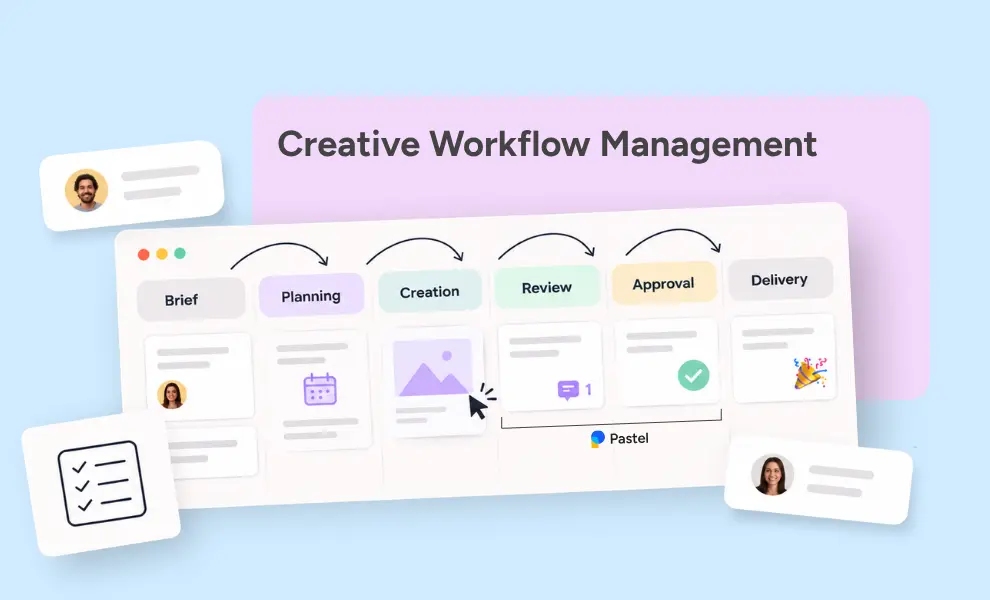
Creative workflow management is the process of planning, tracking, and reviewing creative work from request to delivery. It covers who does what, in which order, and who signs off at each step.
Think of it as the operating system behind your projects. Larger companies often call this function creative operations, or creative ops. A workflow is simply a repeatable sequence of tasks.
Creative workflows, however, have one twist: the output is subjective. A landing page can be technically perfect and still feel "off" to the client.
That's why creative workflow management leans so heavily on feedback and approval. Unlike a production line, creative work loops back on itself. Drafts get reviewed, revised, and reviewed again.
Consequently, a good system doesn't remove those loops. It makes them faster and clearer.
In short, a solid workflow answers three questions at any moment:
- What stage is this project in?
- Who is responsible for the next step?
- What feedback is still open?
If your team can't answer those in under a minute, your workflow needs attention.
Why creative workflow management is important for agencies and dev teams?
For agencies, time is the product. Every hour spent to chase a client for feedback is an hour you can't bill. Similarly, every misread comment leads to a revision nobody planned for.
Designers feel it differently. Constant context switching kills focus, and vague notes like "make it pop" don't help anyone.
Developers, on the other hand, need precise details: which element, which breakpoint, which browser. Without that, a simple fix turns into a long back-and-forth thread.
Managing creative workflow with a clear process fixes much of this. Specifically, it brings:
- Predictable timelines, so you meet deadlines because every stage has a clear owner
- Fewer revision rounds, since feedback arrives organized and specific
- Happier clients, who always know where their project stands
- Less burnout, as the team stops playing detective with scattered notes
Keeping clients informed is an essential part of this, too. We shared practical ways to do it in our guide on keeping clients in the loop.
The six stages of a creative workflow
Every team's process looks a little different. Still, most creative projects move through the same core stages.
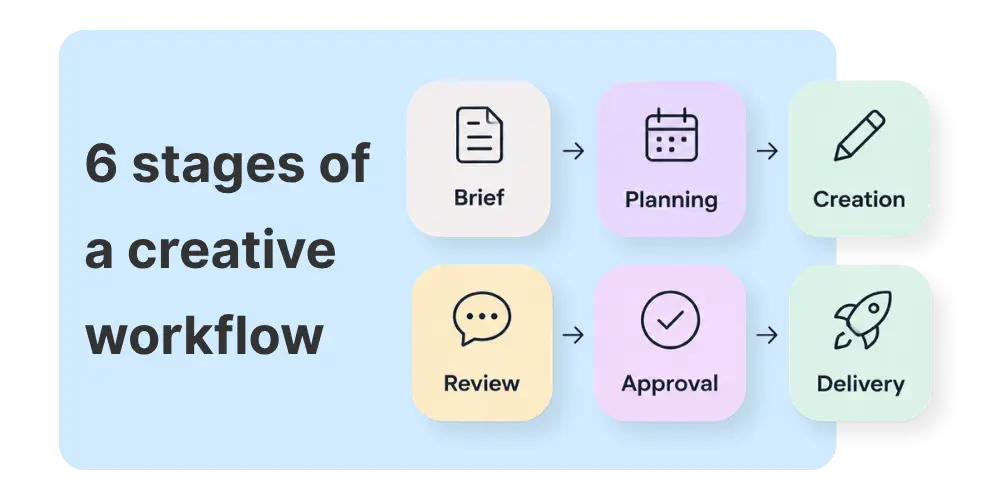
- Intake. A request arrives from a client or internal stakeholder. At this point, you capture goals, audience, budget, and deadline in a creative brief.
- Planning. Next, you break the work into tasks, assign owners, and set milestones. This is also where you decide who reviews what.
- Creation. Designers design, writers write, and developers build. Ideally, nobody interrupts them with status questions.
- Review. Stakeholders look at the work and leave comments. This stage usually takes the most time, and it causes the most friction.
- Approval. Once all feedback is resolved, the decision-maker gives final approval. At that point, the work is reviewed and approved, and officially locked.
- Delivery. Finally, you hand off files, launch the site, or publish the campaign. Then you archive creative assets so they're easy to reuse in future projects.
Notice that stages 4 and 5 often repeat several times. That loop is where most projects either stay on track or quietly fall apart.
Creative workflow management examples by team type
The core stages stay the same, but each team bends them differently. Here's how creative workflow management usually looks across three common setups.
- Creative agencies. Design studios and creative agencies juggle many clients at once. Intake and approval consume most of their time.
A typical flow runs from brief to moodboard, then concept, revisions, and final files. The key is limiting revision rounds in the contract and tracking them in the workflow. That way, scope creep becomes visible before it eats your margin.
- In-house marketing teams. Marketing teams ship campaigns across many channels, often on tight deadlines. Their bottleneck is usually the review stage, because legal, brand, and leadership all want a say. Therefore, a fixed review order works well: copy first, then design, then a final compliance check.
- Web development teams. For dev teams, feedback must be technical and precise. Reviewers comment on staging sites, and developers need the element, browser, and screen size.
Here, the review stage often connects directly to the codebase. In fact, some teams now let AI coding agents pick up approved comments and apply the fixes.
Common bottlenecks in creative workflow management
Even talented teams hit the same walls. Here are the bottlenecks we see most often.
Feedback lives in too many places
A client emails a screenshot. Then a teammate adds notes in Slack. Meanwhile, the project manager mentions something else on a call. Before long, nobody is sure which comment is the latest one.
Scattered feedback is the number one reason revisions drag on.
Nobody knows who has the final say
When five people review a design, you often get five conflicting opinions. Without a clear decision-maker, the team tries to please everyone. As a result, the team dilutes the work and stretches the timeline.
Version chaos breaks creative workflow management
When versions multiply, people comment on outdated files. Consequently, designers redo fixes for issues they already resolved, or they miss new ones entirely. Version control isn't glamorous, but it saves hours every week.
Vague comments nobody can act on
"Can we make this feel more premium?" is a real piece of feedback. Unfortunately, it's also impossible to act on without a follow-up call. Vague notes force designers to guess, and wrong guesses add revision rounds. On top of that, comments without context leave developers hunting for the right element.
Specific feedback in context is the fix, and we'll get to it shortly.
How to build a creative workflow management process
Managing creative workflow better doesn't require a massive overhaul. In fact, small changes usually stick better than big ones. Start with these six steps.
Step 1: Map your current workflow first
Before changing anything, write down how projects actually move today. Not the ideal version, the real one. Ask your team where work gets stuck and where they wait on others. Often, the biggest delays hide in handoffs nobody owns.
Step 2: Standardize the creative brief
A weak brief creates weak feedback later. So, use one template for every project. Include the goal, target audience, key message, deliverables, deadline, and approver. When everyone starts from the same page, reviews become much easier to judge.
Step 3: Set clear review and approval rules
Decide upfront who reviews, in what order, and how many rounds are included. For example, you might allow two revision rounds before extra work is billed. Also, name a single final approver for every project. This one rule alone can cut weeks from a timeline.
Want to go deeper on approval processes? Read our guide How to Optimize Your Approval Workflow and Save Time for a full breakdown.
Step 4: Collect feedback directly on the work
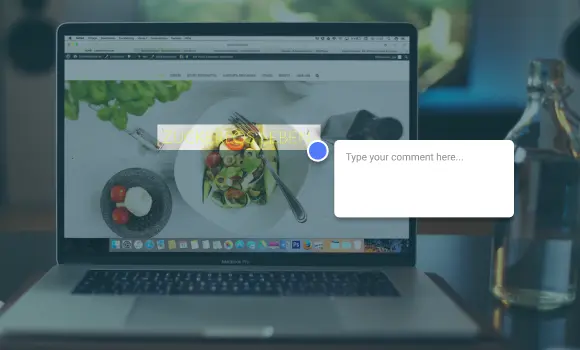
Feedback works best when it sits right on top of the thing being discussed. Instead of describing a button in an email, reviewers click on it and comment. This is called visual feedback, or annotation, and it removes most of the guesswork.
For websites, this is even more relevant. A good annotation tool captures technical details automatically, like browser, screen size, and the exact element. That way, developers get what they need without a single follow-up question. Try Pastel today and see how our annotation tool works.
Step 5: Automate creative workflow management where it helps
Workflow automation shouldn't replace human judgment. However, it can handle the boring parts. Think automatic reminders for pending reviews, alerts when a comment is resolved, or tasks created straight from feedback. Plus, integrations with tools your team already uses mean fewer tabs and less copy-pasting.
This is especially useful for dev teams that already build with AI coding assistants. With Pastel for AI agents, tools like Cursor, Claude, or ChatGPT can read open comments directly. They connect through MCP (Model Context Protocol), an open standard that lets AI tools talk to other apps.
Each comment arrives with the page, the pinned element, and any attached screenshots. Then the agent automatically makes the change in your codebase, replies with what it did, and resolves the comment. Best of all, the agent only acts when you run it, so you stay in control.
Step 6: Track creative workflow management with clear statuses
A workflow is only useful if your whole creative team can see it. So, give every project and every piece of feedback a visible status. Keep the labels simple, like To do, In progress, In review, and Approved. Anything more complex usually gets ignored.
Statuses also make stand-up meetings shorter. Instead of asking everyone for updates, the team checks one board. Likewise, clients can see progress without sending "any news?" emails.
When someone marks a comment as resolved, the reviewer knows someone handled it. That small signal builds a surprising amount of trust.
Choosing creative workflow management software
No single tool runs your whole process. A project management tool handles tasks well, but rarely handles visual feedback. Instead, most teams combine a few, each covering a specific job.
When you evaluate creative workflow management software, keep one question in mind: will clients actually use it? A powerful platform is useless if reviewers refuse to create another account. That's why guest-friendly review tools tend to get far better adoption.
Clients adapt to Pastel almost instantly. They don’t need a walkthrough, and they rarely come back with questions about how it works.
It also helps to check integrations early. Your feedback tool should talk to your project tracker, not compete with it. Otherwise, you're just adding one more place where information gets lost.
How to measure your creative workflow management
You can't improve what you don't track. Fortunately, you don't need a complex dashboard. A few simple metrics will tell you whether your process is working.
- Revision rounds per project. If most projects need four or more rounds, your briefs or review rules need work.
- Time in review. Measure how long work waits for feedback. Long waits usually point to unclear reviewers or slow clients.
- On-time delivery rate. Track the share of projects delivered by the original deadline.
- Feedback response time. Check how fast your team acts on comments once they arrive.
Review these numbers once a month. After all, optimizing your creative workflow is an ongoing habit, not a one-time project. Then pick one bottleneck to fix at a time. Small, steady improvements beat a full process overhaul every quarter.
Make creative workflow management work for your team
A great creative process isn't about rigid rules. Rather, it's about removing friction so your team can focus on the work itself. Start small: fix your brief, name your approvers, and get feedback out of the inbox. Then build from there.
If scattered feedback is your biggest headache, Pastel can help. Clients and teammates comment directly on live websites, images, and PDFs, with no signup required. Every note lands in one place, organized and ready to act on, whether by your team or your AI agent.
Start your free Pastel trial and see how much smoother reviews can feel. Ultimately, fewer feedback loops mean faster launches and more room for great creative workflow management.