
.png)


Workflow approval software helps teams replace messy reviews with a faster feedback process and smoother execution. If your team still relies on long email threads and scattered comments, you already know the cost of the endless back and forth and misguided messages. Without a workflow approval tool, teams often slow down and deadlines start slipping.
However, a better approval process can fix tons of that friction and make it more efficient. With the right structure, teams can move faster with clear instructions while reducing rework.
For marketing teams, agencies, designers, and developers, approval workflows often sit at the center of delivery. I honestly can’t count how many times, as a marketing manager, I’ve seen a landing page delayed, a campaign pushed back, or a design stuck in review simply because feedback wasn’t clear or approvals were scattered across too many places. So, when the approval process breaks, everything else slows down too and we start to miss deadlines.
That is why improving the approval workflow matters just as much as actually getting the task done.
What is an approval workflow?
An approval workflow is the process a piece of work goes through before it's considered ready to move forward. In other words, it's the stage where the work needs a check up before proceeding to the next step.
It is important to recognize that approval is not usually a one-step process. In most cases, the work passes through several people before it gets the green light. One person checks for accuracy, another makes sure everything is compliant, and eventually a stakeholder gives the final approval.
The problem is that many teams don't have a clear process for handling approvals. Feedback gets buried in email threads, stakeholders jump in before the work is ready for review, and people aren’t always sure who makes the final call. I've seen projects sit untouched for days due to lack of communication.
Basically, when the approval workflow is clear, teams avoid confusion and move fast. When it’s not, approvals become a bottleneck.
For a more in-depth breakdown of approval stages, this complete guide to approval workflows will help you build a faster, cleaner process.
The definition of an approval workflow
At its core, an approval workflow defines how work gets reviewed - who submits, who reviews, who approves, and what happens next. With that in place, the process becomes easier to follow and easier to improve.
A good workflow answers questions like:
- Who needs to review this work?
- In what order should feedback happen?
- Who gives the final sign-off?
- What happens if changes are needed?
- Where should comments and approval status live?
Without those answers, teams improvise. As a result, they waste time chasing updates, clarifying decisions, and comparing versions.

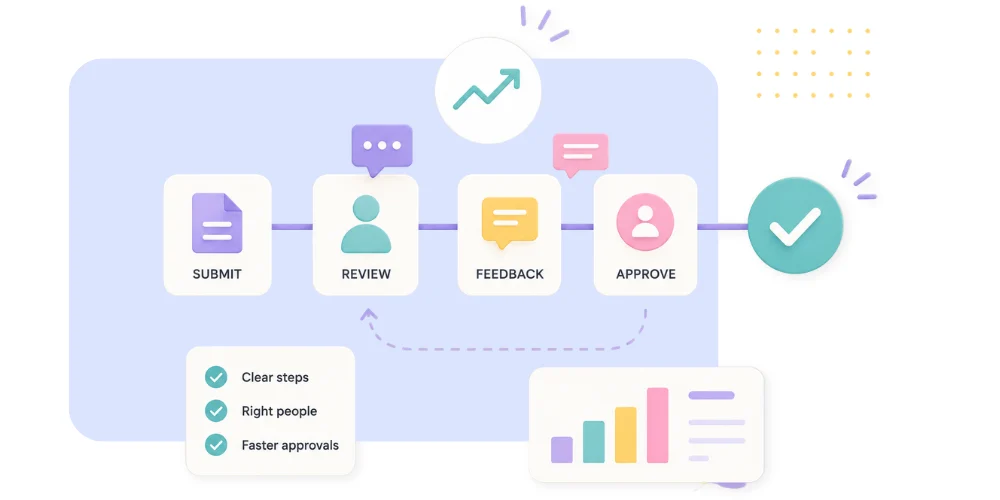
The 4 core stages of an approval workflow
Most approval workflows follow four core stages:
- Submission: A team member submits a request, asset, document, or task for review.
- Routing: The work is sent to the right reviewer or approver based on predefined rules.
- Review and decision: The reviewer approves the item, rejects it, or requests changes.
- Finalization: Once all approvals are complete, the work is cleared for launch, handoff, or execution.
These stages sound simple. However, many teams skip the structure between them and that is where delays begin. If routing is messy, work sits untouched. If review happens in five places, something will get lost or be missed. If final approval isn’t clearly assigned, no one knows when the work is truly done.
Common approval workflow examples across teams
Approval workflows exist across different departments. For example:
- Marketing and creative teams review copy, design, ads, social posts, and landing pages.
- Developers review websites, prototypes and bug fixes.
- Finance teams approve budgets, invoices, and expense requests.
- Legal teams review contracts, vendor documents, and policy updates.
- IT and operations teams handle software access, procurement, and system changes.
Although the content changes for each department, the pain points stay similar. Teams need a clear way to review work, collect feedback, and move forward without confusion.
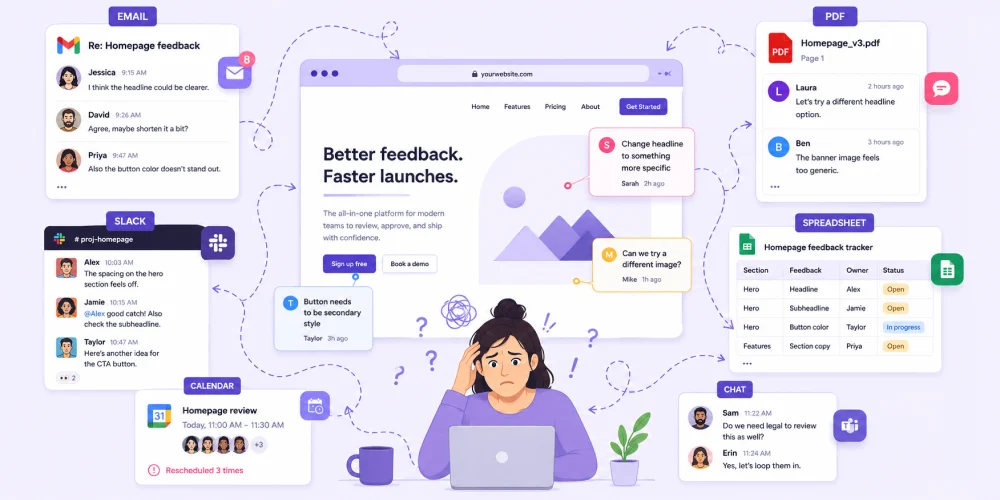
Why approval workflows often become slow and inefficient
Most slow approvals aren’t caused by lazy teams - they come from broken systems. Therefore, the goal isn’t to ask people to respond faster. It’s to design a workflow that eliminates the back-and-forth emails and makes faster decisions possible.
Too many stakeholders involved
Many teams pull in more reviewers than necessary. That feels safer, but it usually creates delays, conflicting opinions, and diluted accountability.
Not every stakeholder needs to comment on every detail. Some should review strategy, others should check compliance, and one person should own the final approval. When everyone is an approver, no one truly owns the outcome. That makes teams spend more time sorting through opinions than actually moving the work forward.
Feedback scattered across email and chat
Just imagine this situation for a website approval: One comment is buried in Slack, another lives in an email thread from three days ago, and someone added notes directly on a PDF.
Meanwhile, a stakeholder mentions “just one quick change” on a call that nobody documented. Now, the team gets stuck piecing feedback together like a puzzle.
Comments get missed, discussions repeat, and nobody is sure which version is the latest. The team spends more energy organizing feedback than acting on it.
This is far more common than it should be - a centralized review process fixes a lot of that chaos. When feedback lives in one place, teams can review changes faster, avoid redundant conversations, and always know who owns a task so projects can move faster with less confusion.
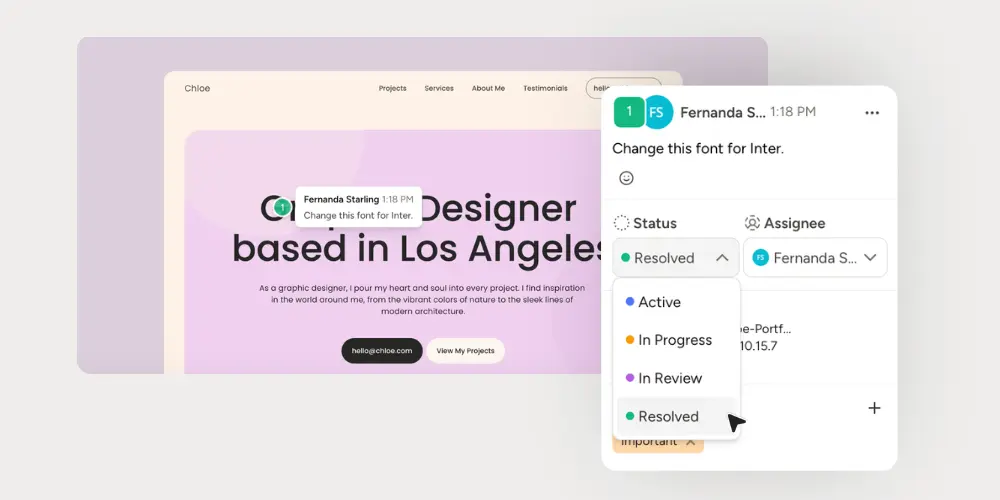
That is also why collaborative annotation tools like Pastel make approvals a lot easier. Instead of chasing feedback across five different platforms, teams can review, comment, create a task, appoint an owner and approve directly on the live page.
No clear routing or ownership
Routing defines where work goes next.
If that path is unclear, teams start guessing about next steps. Someone might forget to tag a stakeholder or assume the work was already approved. The task stalls, or worse, moves forward with tons of mistakes that cause rework or ship the wrong thing entirely.
Clear routing keeps work moving. It also reduces the social friction of follow-up, because the next step is already built into the process.
Version confusion
When teams review the wrong file, approval becomes meaningless. This is common with design revisions, content drafts, and website updates. This step ends up wasting everybody's time, since version 4 already has several topics from version 1 corrected.
Version control keeps one clear source of truth for the latest file or draft. That's why review tools like Pastel matter. Whenever a colleague opens the shared link, they’re always seeing the most up-to-date work. In addition, they can also see previous comments and avoid repeating the same discussions. Without it, rework becomes almost guaranteed.
Keeping everyone on the same version becomes much easier when projects can be shared through a single source of truth. Shareable projects help reviewers access the latest version without hunting through old files or email attachments.
Manual and repetitive tasks
Some of the most common manual tasks that slow teams down on a daily basis include:
- Repetitive reminders
- Status updates
- Approval requests
- Chasing feedback
These tasks may look small, but they add up quickly across dozens of projects. Let me remind you that your project approval may be a priority for you, but stakeholders are often juggling dozens of priorities. Without a pre-established schedule your approval may be pushed down on their pile.
A stronger workflow removes as much admin work as possible. Then the team can spend more time reviewing real work instead of managing process clutter.
The hidden cost of a messy approval process
A weak approval system does more damage than most teams realize. It doesn’t just create delay, it also affects quality, morale, and trust across departments. Most of all though - it costs time, which is one of the most valuable assets a company has.
Time lost chasing reviews
Every unclear step creates follow-up work. Team members ask what is next, whether feedback is final, and whether a decision has been made. That time rarely appears in project plans, but it quietly drains capacity. And there are only so many times a person can redo the same work before it starts affecting morale.
Delayed launches and missed deadlines
When the approval stage is off it causes campaigns to launch late, pages sitting unpublished, and assets missing deadlines. Sometimes the work is done, but the process around it is not. Therefore, the entire delivery timeline shifts.
More revisions and unnecessary rework
Messy approvals create duplicate work. Often, a team might audit the wrong version of aPDF and stakeholders change the direction based on outdated feedback. That’s before accounting for the miscommunication due to long email threads and multiple chats. Suddenly, the project loops back to the beginning instead of moving forward.
Less accountability across the team
Good workflows make ownership visible. If no one knows who approved a file, who requested a change, or who made the final call, accountability disappears.
An audit trail helps here - a record of who reviewed what, when, and what decision they made. That record reduces confusion later and gives teams a clear reference point if questions come up. Most teams will use project management tools to track this automatically.
Lower visibility into decisions
Teams need to know what was approved, what changed, and what is still pending. Otherwise, contributors lose momentum and may leave the project unnecessarily on hold.
If your team often struggles with feedback clarity, read this related post on how to give better website feedback.
How to optimize your approval workflow?
Improving approval speed is not about rushing people. It is about creating a process that removes friction before it starts. Here is a practical framework.
1. Start with clear submission rules
Every workflow should answer a few questions
- What needs to be submitted?
- In what format?
- With what context?
For example, a landing page request might require goals, audience, draft copy, and a deadline.
Clear inputs lead to better reviews. Without them, reviewers waste time asking basic questions.
2. Build smarter routing for each request
Not every task needs the same path. For example, a homepage redesign may need design, content, legal, and executive sign-off, but a blog update may only need editorial review. Therefore, routing should match the type of work.
3. Define who reviews and who signs off
Review is not the same as approval. While reviewers give feedback, approvers make the final decision. When these roles are mixed up, teams get stuck in endless comment cycles.

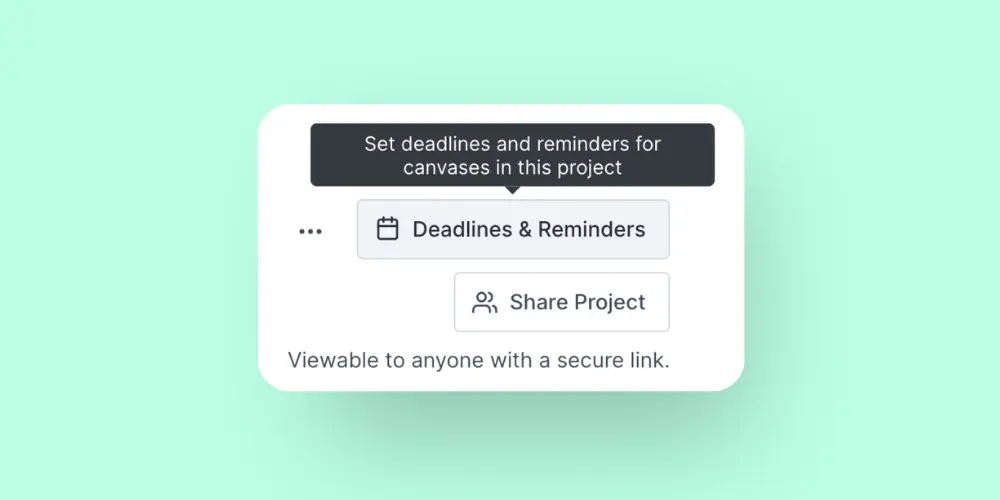
4. Set deadlines for every stage
Approvals expand to fill the time available. So set deadlines for review and sign-off. Even simple timelines create momentum.
5. Keep feedback and decisions in one place
This is one of the highest-impact fixes, the one that makes the process more accurate and avoids duplicate work. Use one system for comments, change requests, and approval status. Then no one has to search across tools for context.
If your team reviews websites regularly, this guide on website feedback explains why centralized comments help reduce confusion and speed up approvals.
Teams looking for a more structured review process can also explore features like visual commenting, approval tracking, task ownership, and version control to keep projects moving smoothly.
6. Automate processes
Automate all possible steps like: status updates, notifications, and next-step routing. Even light automation removes repetitive work and reduces delays.
7. Create a simple version control process
Make it obvious which file is current. Archive old versions clearly and label revisions consistently. That way, approval always happens on the right asset. You can also use Pastel to create a live canvas to keep the latest version in one place. This way no one can accidentally review something outdated.
8. Track approvals with an audit trail
Teams move faster when decisions are visible. A reliable audit trail shows who approved what and when, which becomes incredibly helpful when you're trying to understand why a decision was made or who signed off on a particular change. When feedback, approvals, and ownership are all documented in one place, there's far less confusion later on. That also helps keep projects organized long after they are completed.
9. Use multi-step approvals only when necessary
Not every task needs five layers of review. In fact, too many approval stages usually create more risk, not less. So reserve multi-step workflows for high-impact or high-risk work.
10. Review the workflow regularly and improve it
No workflow stays perfect forever. Team structure changes and new bottlenecks appear. You should review your process regularly and remove unnecessary steps as you learn.
Approval workflow best practices for marketing and creative teams
Creative work needs feedback. However, it also needs momentum. The best approval systems support both. It's hard to understand and balance it, but once you do the team becomes way more productive.
Separate feedback from final approval
A brainstorming session should not be treated like a final product round. Early feedback helps shape the work, but final approval confirms it is ready to launch. Keeping those moments separate prevents confusion.
Avoid approving work in email threads
Email is easy, but it makes a poor approval system. A person receiving five emails with different versions of the same file will eventually lose track. Attachments get missed, versions get mixed up, and feedback gets buried. Instead, use a shared review space where status and comments are visible and everyone is always working from the same file.
Limit reviewers to the people who matter
More opinions don’t always improve quality. In many cases, they slow down the work and create conflicting directions. Choose reviewers based on role, and avoid involving unnecessary reviewers.
Make status and next steps visible
Teams should know whether a page is in review, waiting on edits, or approved. Visible status reduces follow-up and keeps projects moving.
Prevent last-minute approval bottlenecks
Late feedback often signals a broken process upstream. Bring the right stakeholders in earlier, with clear expectations. That way, final approval becomes faster and more assertive.
If your team still struggles with scattered comments and unclear approvals, the Pastel blog has more practical guides on website feedback, collaborative reviews, and creative approval workflows.
How workflow approval software helps teams save time?
I've worked with teams that had great people and clear deadlines, yet projects still got stuck in review. The issue wasn't the work itself, it was everything happening around it.
Someone forgot to include a stakeholder, feedback was buried across six different files, or a reviewer assumed somebody else had already approved the asset. It was a complete nightmare.
That's where a structured approval platform can make a real difference.
It removes the guesswork
One of the biggest time drains in any approval process is simply figuring out what happens next. Who's reviewing this? Has anyone approved it yet?
A strong approval system answers those questions without forcing the team to chase updates. Everyone can see where a project stands and who's responsible for the next step. This way they can spend their valuable time on other projects instead of constantly following up.
It improves transparency
I've seen approvals happen across email, Slack, Zoom calls, spreadsheets, and project management tools all at the same time. Eventually, nobody is completely sure which feedback is current and you end up spending time and energy putting the puzzle together.
When comments, approvals, and status updates live in one place, teams spend less time searching for information and more time acting on it.
It makes accountability easier
Most approval issues aren't caused by people avoiding work. They're usually caused by a lack of visibility.
When ownership is clear, everyone knows who's reviewing, who's approving, and what's still waiting on a decision. That transparency eliminates a lot of unnecessary follow-up and finger-pointing.
It reduces bottlenecks
A simple approval process might work when you're handling a handful of projects each month. Things get more complicated when multiple campaigns, website updates, design requests, and stakeholders are all moving at once.
A collaborative review tool helps keep those moving pieces together and organized without requiring someone to manually coordinate every step.
It reduces follow-ups
If you've ever sent a "just checking in" message for the third time, you already understand the problem.
Many approval delays happen because people simply forget. Automated reminders, notifications, and status updates help to keep the work moving without someone having to remind the same colleague about a task multiple times a week.
At the end of the day, approval workflow tools are designed to remove small delays and communication gaps that slow projects down. When you have a clear path, teams spend less time managing the process and more time doing the work itself.
Common use cases for workflow approval software
Different teams use approval systems in different ways. However, the goals are usually the same: clarity, speed, and fewer mistakes.
Marketing and creative approvals
This includes campaigns, landing pages, ad creative, email designs, social assets, and content reviews. These workflows often involve multiple stakeholders and several rounds of feedback, so keeping everyone aligned can become a challenge.
Having a live Pastel canvas that everyone can access helps ensure the team or client is reviewing the correct version, reducing confusion and preventing feedback from getting scattered across different files.
If your approval process also involves client reviews, this guide on keeping clients in the loop shares practical ways to collect feedback without creating extra back-and-forth.
Designers and developers
This includes website redesigns, landing page updates, product pages, feature releases, and UI improvements. These projects often require designers, developers, project managers, and stakeholders to review the same work at different stages, which can easily lead to version confusion and conflicting feedback. That's when a workflow approval tool is so important.
If your team struggles with handoffs between design and development, as we all know can happen, this guide on working more effectively between designers and developers offers several practical tips.
Document approval workflows
Documents need review too. For example, policy changes, internal memos, or content drafts all benefit from clearer sign-off steps.
Budget and finance approvals
Finance workflows need controls and traceability. Therefore, routing, deadlines, and approval records become especially important.
Legal and contract reviews
Legal review often requires precise tracking. Teams need to know which version was reviewed, what changed, and who approved the final document.
IT and operations requests
System access, vendor approvals, and procurement requests all move faster when the process is structured and visible.
What to look for in an approval workflow tool?
Not all approval software works the same way. Some tools focus on project management, while others are designed specifically to simplify reviews, approvals, and feedback collection.
Before choosing a solution, it's worth understanding which features will actually help your team work faster and avoid common approval bottlenecks. Here are some points you should consider.
Centralized feedback
One of the biggest challenges in any approval process is feedback being spread across emails, chat messages, PDFs, and meetings. A good approval system keeps comments, revisions, and approvals in one place, making it easier for everyone to stay aligned.

Approval tracking
Teams should never have to wonder whether something has been approved or who is responsible for the next step. Good workflow approval software should show who commented, who it’s assigned to, and the status. Approval tracking provides full visibility into a project, helping stakeholders understand what is pending or approved.
Audit trails
A reliable audit trail creates a record of decisions, approvals, and changes throughout a project. This becomes especially useful when reviewing past work, resolving disagreements, or understanding why a particular decision was made.
Version control
Reviewing the wrong file can create unnecessary delays and confusion. Your approval platform should make it clear which version is current and ensure everyone is reviewing the same asset before giving feedback or approval. A live Pastel canvas is perfect for this job.

Project management integrations
Many teams already use tools like Trello, Asana, ClickUp, or Jira to manage projects. Choosing software that integrates with existing workflows can reduce manual work and make it easier to move tasks from review to execution.
Integrations can also reduce duplicate work by connecting comments directly to the tools your team already uses. For example, many teams link approval workflows with project management and communication platforms so tasks can move automatically after sign-off.
If integrations are important for your workflow, it's worth checking whether your approval software connects with the tools your team already relies on. That can save time, reduce context switching, and make the approval process much easier to manage.

Automated reminders
Approvals often get delayed because people are busy, not because they are intentionally ignoring requests. Automated reminders help keep reviews moving without requiring constant follow-up from project managers or team members.
Task ownership
Every approval process needs accountability. The best workflow approval software makes it easy to assign owners, track responsibilities, and see who is responsible for the next action. This helps eliminate confusion and keeps projects moving forward.
Signs your team needs a better approval process
Your team may need a better approval system if any of these feel familiar:
- Approvals happen mostly in email
- No one knows who owns final sign-off
- Reviewers comment on the wrong version
- Deadlines slip because approvals arrive late
- Teams chase updates manually
- Stakeholders ask for status in multiple places
- Decisions are hard to trace after launch
If that sounds familiar, the issue may not be your team. It may be your process. See some tips on how to reset the product roadmap and create the best workflow for your team.
Final thoughts on approval workflow tools
At the end of the day, the teams that move faster aren't necessarily the ones working harder. After working with different teams and projects over the years, I've learned that most delays don't happen because the work is difficult. They happen because feedback gets lost and approvals take longer than expected.
Having a clear approval process helps eliminate a lot of that confusion. When everyone knows where to review work, who's responsible for the next step, and what has already been approved, projects tend to move much more smoothly.
If your team is dealing with scattered feedback, approval bottlenecks, or endless revision cycles, it's worth looking at the tools and processes you're using today. The right workflow approval software won't solve every problem, but it makes collaboration a lot easier and helps keep projects moving forward without so much back and forth.
For teams that review websites, landing pages, PDFs, and digital assets regularly, tools like Pastel help centralize feedback, track approvals, and keep everyone working on the correct project version. If you'd like to see how agencies and in-house teams manage reviews and approvals in practice, you can browse customer stories from teams like Calendly, BentoBox, and Lemonly, or start with a free trial to test it with your own workflow.