.png)


Every delayed website launch has one thing in common: unclear feedback. Website annotation software replaces messy email threads with structured, in-context comments directly on live or staging sites. It reduces revision chaos and centralizes approvals.
Today, agencies and developers need more than screenshots and email threads. They need structured collaboration on live and staging sites. Without it, inboxes quickly fill up, email attachments pile up, and people lose screenshots between threads.
That leads to teams wasting time downloading, renaming, and re-uploading files. As a result, feedback becomes fragmented and easy to miss.
With website annotation software, everything stays in one place. Comments attach to the exact element on the page, and nothing disappears in the noise. Just like an online post-it.

Instead of scattered feedback, modern teams leave precise comments directly on webpages. As a result, misunderstandings drop, rework decreases, and sign-off happens faster.
Even better, some tools let teams turn comments into actionable tasks. As a result, these sync directly with project management tools like Trello, Asana, and ClickUp. In this guide, you will compare the top 10 tools for client feedback. You will also learn the must-have features and see which platform fits your workflow best.
Best Website Annotation Software: Quick Comparison
To help you compare the best annotation tools faster, we created a summary table. This way, you have a general overview of each platform. Below, you'll find a breakdown of every tool so you can decide which one best fits your needs.
In the end, choosing the right website annotation software for client feedback depends on your team's approval workflow. Some tools focus on developer bug reporting, while others prioritize structured client reviews on live websites.
Further down, we review each website annotation tool in detail. We compare features, pricing, integrations, and best use cases. I'm sure this will help you make the right choice!
What Is Website Annotation Software?
Website annotation software is a design or copy review software. It lets reviewers click and comment directly on a live or staging page. The comment ties to that exact spot instead of describing a location in an email. It's literally an online post-it.
In fact, marketing agencies, in-house teams, developers, and designers all rely on this kind of website commenting tool at some point. The truth is, a page passes through more than one person before it ships. The process already involves some form of approval workflow.
The benefit of using a design review software is simple. It includes less guesswork, fewer clarifying emails, and a clear record of what people actually approved.
What Does Website Annotation Software Do on Live and Staging Sites?
Website annotation software can also be called a website visual feedback tool. Therefore, it lets teams leave comments directly on a live website or staging site.
No more screenshots. No more long email threads.
Comments stay pinned to the exact element they refer to. Most tools also capture helpful details automatically, like the page URL, browser, device, and screen size.
Since everything happens right on the canvas, sharing feedback stays simple. For instance, instead of sharing 10 different file versions, just send a link. Clients, designers, developers, and stakeholders can all review the same version, at the same time.
As a result, everyone sees everyone else's comments too, which reduces duplicate feedback. Some tools even let you edit website copy directly on the page, then turn those edits into tasks automatically.
Why a Website Feedback Tool Is Better Than Screenshots?
In practice, screenshots, PDFs, email, and Slack all share the same weakness. None of them stay attached to a live, current version of the page.
Screenshots and PDFs both lose their connection to the page the moment it changes. Email asks the most of a client, since every clarification means writing another message. Slack sits somewhere in between and we forget some of the feedback higher up in the conversation.
Website annotation software is the only approach that stays tied to the live page and keeps the client's effort low.
For example, a screenshot captures one frozen moment. Once the page changes, that screenshot is already out of date. Nobody can be sure which version a comment refers to.
Similarly, a PDF markup has the same problem. Plus it takes effort to export and re-upload.
Meanwhile, email and Slack add more friction still, since every clarification requires a new reply. However, Website annotation software solves this by keeping comments tied to the live page.
Why Agencies Are Moving Away From Screenshot Feedback
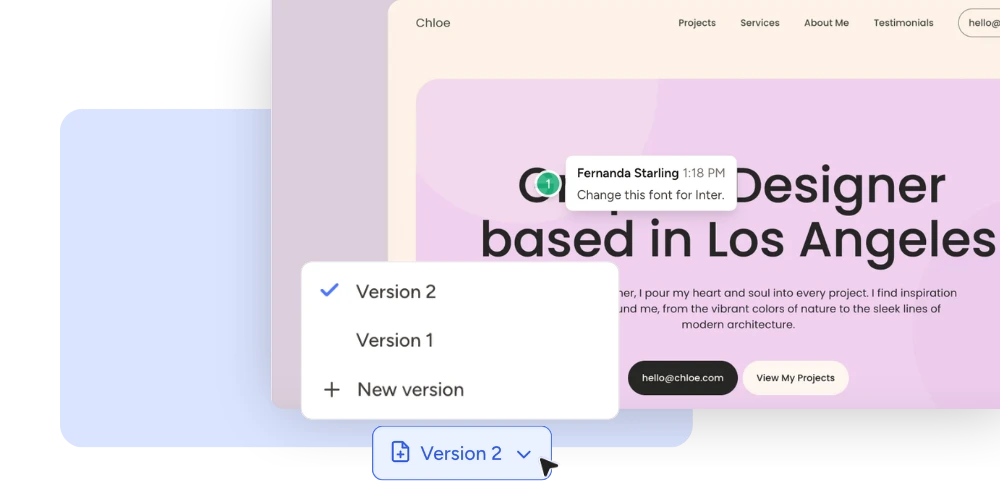
Agencies move away from screenshots, because it's easy to check the wrong page version. They're also inefficient, since someone has to manually piece scattered feedback back together. On top of that, screenshots do not capture responsive behavior. A comment about mobile layout often needs an entirely separate image.
What Makes the Best Website Feedback Tool?
Not every tool built for collecting visual feedback on websites covers the same ground. A few features separate a genuinely useful platform from a basic one. Let's see the most important features on a web design feedback tool.
Easy Website Annotation
Ideally, the best tools let a reviewer click directly on any element and start typing immediately. Clients shouldn't need training or a lengthy onboarding process to leave feedback. A user-friendly interface makes it easy to navigate a website. It should also be easy to switch to commenting when needed, and leave precise feedback without feeling overwhelmed.

Responsive Testing and Feedback Across Devices
A website rarely looks the same on every screen. That is why the best tools let you test responsiveness directly. As well as give feedback on various screen sizes instead of guessing how a page behaves elsewhere.
You should be able to evaluate a site across different scenarios, like tablet, mobile and desktop. Checking usability in each size matters just as much. Otherwise, a layout issue on a smaller screen can slip through unnoticed until a client finds it first.

No Login Required for Clients
Clients should be able to comment without creating an account first. This single detail reduces client friction and speeds up adoption dramatically.

Threaded Conversations
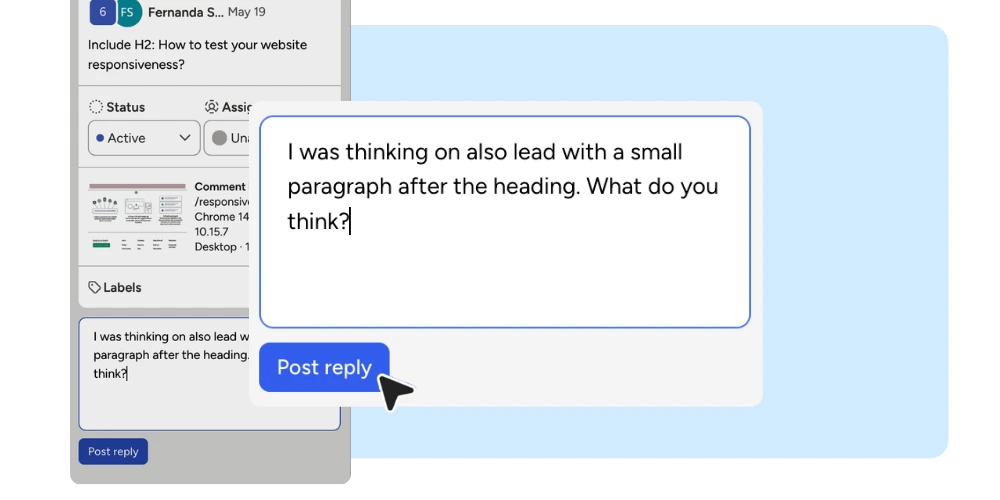
Replies should stay attached to the original comment. Otherwise, a back-and-forth discussion scatters across separate, disconnected notes.
Task Assignment
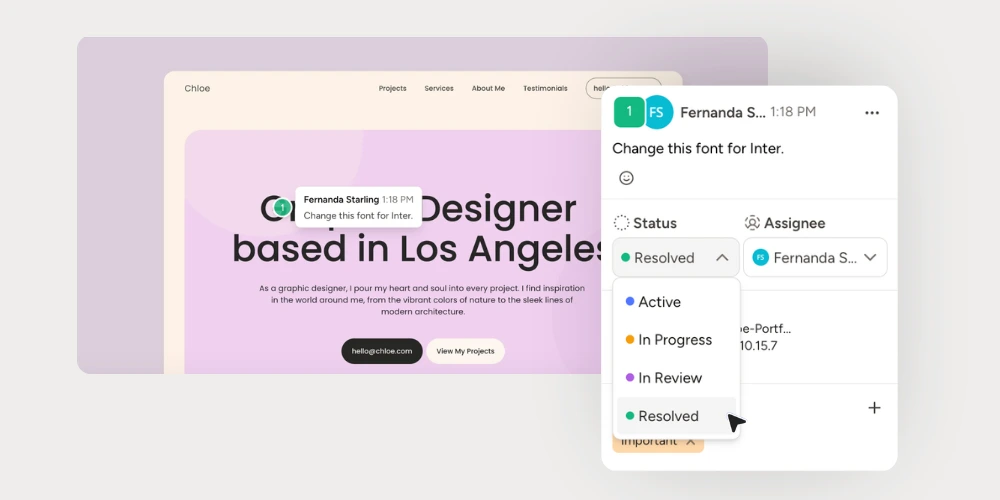
Once feedback is in, make sure to assign tasks to the right person. It keeps ownership clear. Every task should get an owner and a next step.

Approval Workflows
In short, a clear status, such as pending, approved, or resolved, keeps everyone aligned. For more on this, here is a full view on how to optimize your approval workflow and save time.
Integrations
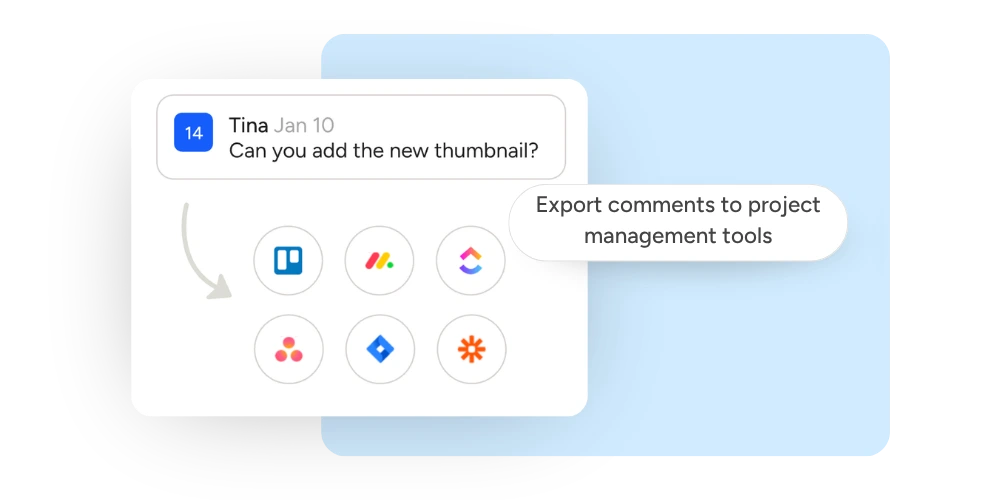
Look for a website annotation system integration with project management software like Asana, ClickUp, Jira, Trello, and Monday. API and Zapier support extend that flexibility further.
Support for Multiple Asset Types
Agencies rarely review only websites. The same team often reviews landing pages, videos, PDFs, presentations, marketing emails, and images too. That is why video comments and other formats work best living in the same interface as website feedback. Teams managing several campaign assets can also review marketing emails in Pastel, or organize a full campaign with shareable projects.

The 10 Best Website Annotation Software Tools
Here is a fair, side-by-side look at the top 10 options. It is based on real pricing and feature research, not assumptions.
1. Pastel ⭐
If your agency manages multiple creative assets, Pastel becomes much more than a website annotation tool. It becomes the central place where every review happens.
Best for: Marketing agencies, creative teams, freelancers, designers, developers and client approvals. Pastel has an extremely easy to use interface making it easy for clients to give feedback.
Overview: Pastel was built to simplify team and client feedback, with a focus on simplicity and being client-friendly. Instead of installing a script or juggling screenshots, reviewers just open a shared link and click anywhere on the live page, PDF, image, or video to leave a comment. In addition there's no account required for clients.
Every annotation stays pinned to the exact spot it was left in the same live canvas, making revisions much clearer for designers and developers. Because Pastel works across websites, PDFs, images, and video from one dashboard, it doubles as a lightweight approval hub for teams juggling more than just web pages. Comments can be assigned, marked resolved, and exported to tools like Trello, Asana, or Jira once the team is ready to act on them.
Supported files: Websites, landing pages, emails, PDFs, presentations, images, and videos.
Pros: Structured approvals, integration with Zapier, Adobe and PM tools (Monday, Asana, Jira, Trello and Clickup), responsive review across devices, and multi-format annotation, all in one workflow. Extremely easy-to-use interface.
Cons: Built specifically around visual and website feedback. Teams needing deep code-level bug tracking may want a developer-focused tool alongside it.
Pricing: Plans are available to teams of every size, viewable on Pastel's pricing page, going from a Free plan at $0 to Enterprise at $450/mo. Let's use the Pro plan for comparison. It starts at $35/mo for 2 users and 3 active canvases. If billed annually the pro plan falls back to $29/mo.
Free trial: Yes, 14-days no credit card.
Free plan: Yes.
2. Feedbucket

Best for: Agencies running ongoing client site work who want feedback tied directly into their existing project management tool.
Overview: Feedbucket takes a developer-first approach to website feedback. Instead of proxying a live URL, it uses a JavaScript snippet embedded directly into your site. Once installed, clients and team members can highlight any element and leave a comment. Feedback is then synced bidirectionally with project management platforms.
Supported files: Websites (requires a script install)
Pros: Integrations with tools like Asana, ClickUp, and Jira. Status updates on both automatically.
Cons: The script tag needs to be added to the site. That requires at least minimal developer access, unlike a tool that proxies a live site
Pricing: Plans start at $49 for the pro, with higher monthly tiers from $89 to custom price for enterprise plan.
Free trial: Yes, 14-days no credit card.
Free plan: No.
3. Marker.io
Best for: Product, web, and QA teams that need technical bug reports alongside client feedback.
Overview: Marker.io is built around the idea that every piece of feedback should come with full technical context. Marker.io automatically captures screenshots, annotations, and advanced technical metadata like browser version, operating system, viewport size, and even console logs. This information is then pushed directly into issue trackers like Jira and ClickUp, where developers can reproduce bugs.
Supported files: Websites.
Pros: Strong integrations, including Jira, Trello, ClickUp, and GitHub.
Cons: Its strength leans toward technical bug tracking. That can feel like overkill for a simple client approval on a marketing page. Adding the script tag to the site takes a small code change. Unlike a tool that proxies a live site, this means a developer needs to be involved.
Pricing: Plans start at $59 per month for the starter plan, with higher monthly tiers from $199 to custom price for the business plan.
Free trial: Yes, 14-days no credit card.
Free plan: No.
4. BugHerd

Best for: Agencies and web dev teams running client user acceptance testing, or client UAT, who want feedback and task tracking in one place.
Overview: BugHerd tool overlays a feedback layer on top of any website, allowing clients to click, pin, and comment without needing to create an account. Each comment automatically becomes a task on a built-in Kanban board. It also captures contextual data like screenshots, browser info, and OS details on submissions, giving developers the technical context they need to act quickly.
Supported files: Websites.
Pros: Automatic screenshot capture plus browser and OS details attached to every comment. Clients don't need to sign up.
Cons: It's focused exclusively on websites, Teams reviewing PDFs, marketing emails, videos, or images will need additional tools.
Pricing: Plans start at $50 per month for the standard plan, with higher monthly tiers from $80 to custom price for the enterprise plan.
Free trial: Yes, 14-days no credit card.
Free Plan: No
5. MarkUp.io

Best for: Teams that need to leave feedback on live, public URL without touching code.
Overview: MarkUp.io uses a proxy-based model, which means there's nothing to install on the client's site. You simply paste a public URL, and the tool generates a shareable annotation link where reviewers can click and comment. This makes it attractive for agencies who want to get feedback moving quickly without waiting for developer access.
Supported files: Live websites, presentations, images, PDF and video uploaded directly.
Pros: Zero-install setup and instant sharing for any public page.
Cons: Cannot capture screenshots on sites protected by Basic Auth, a common staging-site setup. It also does not support feedback from real mobile devices.
Pricing: The Pro plan starts around $79 per month up to custom. They have discontinued their free plan.
Free trial: Yes, 14 days, credit-card required.
Free Plan: No.
6. Ruttl

Best for: Designers and developers who want feedback that goes beyond a comment and into exact style values.
Overview: Ruttl takes a unique approach by letting reviewers propose actual CSS changes directly on the live site. Instead of just saying "make this blue darker," a reviewer can adjust the color value themselves, and the developer can copy that exact value into the code. This reduces ambiguity and speeds up the revision cycle for design-heavy projects.
Supported files: Websites, landing pages, PDFs, images, and videos.
Pros: Live CSS editing, video comments and AI-assisted feedback summaries.
Cons: Pricing is per user, which can add up for larger review teams. The CSS editing feature, while powerful, may be overwhelming for non-technical clients who just want to leave a simple comment.
Pricing: Free plans are available and the others go from $18 for the Pro plan to custom for Business.
Free trial: Yes, no credit-card required
Free Plan: Yes.
7. Filestage
Best for: Larger organizations that need multiple structured review stages and strict permissions.
Overview: Filestage is built for enterprise-scale creative review workflows. It supports a wide range of formats. The tool's strength lies in its structured approval process: you can define multiple review stages, assign specific reviewers to each stage, and set role-based permissions so that internal and external stakeholders see only what they need to see. This makes it ideal for regulated industries or large brands with complex approval chains.
Supported files: Video, images, designs, documents, websites, interactive HTML, and audio
Pros: Role-based access for internal and external reviewers, supports a great range of file types, multi-stage approval chains.
Cons: Its broader, multi-format approach means it is not purpose-built for the fast, simple website approvals many agencies want. The setup can feel heavy for teams who just need to collect quick feedback on a landing page. Pricing also scales steeply.
Pricing: A limited free plan is available. Paid tiers generally start around $250 to custom enterprise plan per month.
Free trial: Yes, no credit-card required.
Free Plan: Yes.
8. Ziflow

Best for: Creative and marketing teams proofing videos, images, and other campaign assets.
Overview: Ziflow is built around creative asset proofing at scale. It's designed to handle large volumes of creative content. Its strength lies in version control and comparison features, and it integrates with popular DAM (Digital Asset Management) systems.
Supported files: Images, video, audio, documents, and live websites/URLs.
Pros: Strong version control across large batches of creative assets. Support different file types and have integration with PM tools like asana and Trello.
Cons: Built primarily around creative asset proofing rather than live website annotation, so website-specific features are more limited. If your main use case is collecting feedback on a live landing page or marketing site, Ziflow's workflow may feel less intuitive than tools designed specifically for web annotation like Pastel.
Pricing: A limited free plan is available. Paid tiers generally start around $249 to custom enterprise plan per month.
Free trial: Yes, no credit card required.
Free Plan: Yes.
9. Usersnap

Best for: SaaS and product teams collecting ongoing feedback from real users, not just a single client project.
Overview: Usersnap combines visual feedback widgets with in-app surveys, feature request boards, and detailed technical metadata capture.The tool is built to be embedded directly into your product, allowing end users to report bugs, request features, or share general feedback without leaving the app. This makes it ideal for SaaS companies and product teams who want to maintain an ongoing dialogue with their user base.
Supported files: Websites and mobile apps only, via embedded widget
Pros: Deep integrations, including Jira, Slack, Azure DevOps, and 50 or more other tools, automatic technical metadata, and combines visual feedback with surveys.
Cons: Built more for continuous product feedback than a one-off website approval. Setup can feel heavier than a simple review needs. In the end, you're embedding widgets into your product, not just sharing a link.
Pricing: Plans vary by source, generally starting at €39 per month. Larger teams can scale toward €319 for the premium plan.
Free trial: Yes, first 20 feedback items, no credit card needed.
Free Plan: No.
10. zipBoard

Best for: Teams reviewing multiple content types beyond websites, including PDFs, and videos.
Overview: zipBoard supports a broad range of formats within one review workspace. This makes it a good fit for teams in education, training, or content marketing who need to review diverse asset types without juggling multiple tools.
Supported files: websites, PDF, images, videos,
Pros: No login required for reviewers, plus a browser extension that lets you annotate almost any page instantly. In addition, it has multi-format support covering websites, PDFs, videos, and audio in one workspace.
Cons: The client feedback learning curve can be steeper than simpler tools and price range is also higher if compared to other tools.
Pricing: Plans start around $99 per month for a Team plan, with an Agency tier near $199 per month. Its enterprise plan is custom.
Free trial: Yes, 14 days, credit-card required.
Free Plan: No
Website Annotation Software vs Bug Reporting Software
These two categories overlap, but they solve different problems. Website annotation software, like Pastel, is built around fast, easy, and visual client approvals.
Bug reporting software, like Marker.io, BugHerd, and Usersnap, works differently. It is built around capturing technical detail for a developer to fix an issue.
If your main goal is a fast client sign-off, website annotation software is the better fit. If your main goal is helping a developer reproduce and fix a bug, dedicated bug reporting software serves you better.
How to Choose the Best Website Annotation Software
It can be hard to choose the best review process for you and your team. However, a few honest questions can narrow the list quickly.
Is it easy for clients?
Put simply, a tool has already failed if a client needs a tutorial just to leave a comment.
Does it require an account?
In fact, every login requirement is one more reason a client delays their feedback. Favor tools that skip this step entirely.
Can it support your entire workflow?
Check whether the website feedback and annotation software covers every asset type your team actually reviews, not just websites.
Does it integrate with your existing tools?
Feedback that has to be manually copied into your project management tool adds hidden work. That adds up week after week.
Can your team track Progress?
Look for a tool that offers clear statuses, so anyone can see what is resolved, what is pending, and what still needs attention.
Website Annotation Best Practices for Agencies
A few habits make any of these tools work better. Be specific about the change you want, instead of leaving a vague note like "this feels off." Also group related feedback together before requesting new revisions.
That way, editors can address several points in one pass. Keep internal team discussion separate from client-facing comments. Private replies cover this in more depth. Finally, assign every comment to a clear owner, and review the final version carefully before approving it.
Common Mistakes When Choosing Website Annotation tool
A few mistakes come up often when agencies pick a new tool. Choosing software built for developers instead of clients often frustrates the people who actually need to leave feedback.
Ignoring the client experience, using several review tools at once, and forgetting mobile reviews all lead to the same outcome. So does focusing only on price. Adoption suffers, and teams end up back where they started.
Final Thoughts on the Best Website Annotation Software
The right choice ultimately depends on what your agency actually needs day to day. For most agencies running frequent client reviews on live sites, images, PDFs, and videos, a client-friendly tool wins out. Login friction is rarely worth trading for a heavier, developer-focused platform.
You can explore Pastel's features and pricing directly. A few related reads can help too: keeping clients in the loop, optimizing your approval workflow, and shareable projects.
If you are ready for the best website annotation software, try Pastel for free.